Restart Uniflow Smartclient
How to restart the uniflow smartclient
Locate the arrow in bottom right corner of the taskbar

Click the arrow and right click the Uniflow Smartclient app
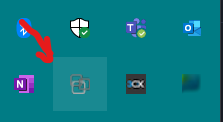
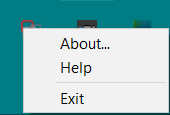
! Note: When the Smarclient logo is grey you are not connected, When it displays in color you are connected!
Next step is to re-open the app, Simply click on the windows logo or search bar and type Uniflow Smartclient --> Wait +-30 seconds to re-open the app!!


You should be all done now!
Locate the arrow in bottom right corner of the taskbar
Click the arrow and right click the Uniflow Smartclient app
! Note: When the Smarclient logo is grey you are not connected, When it displays in color you are connected!
Next step is to re-open the app, Simply click on the windows logo or search bar and type Uniflow Smartclient --> Wait +-30 seconds to re-open the app!!
You should be all done now!